
How to set up automated scorecard and skill selection by meeting type in Demodesk
Set up AI Coach automation rules in Demodesk so the right scorecard and skills are applied to every call based on meeting type, user group, or keywords.

What and why
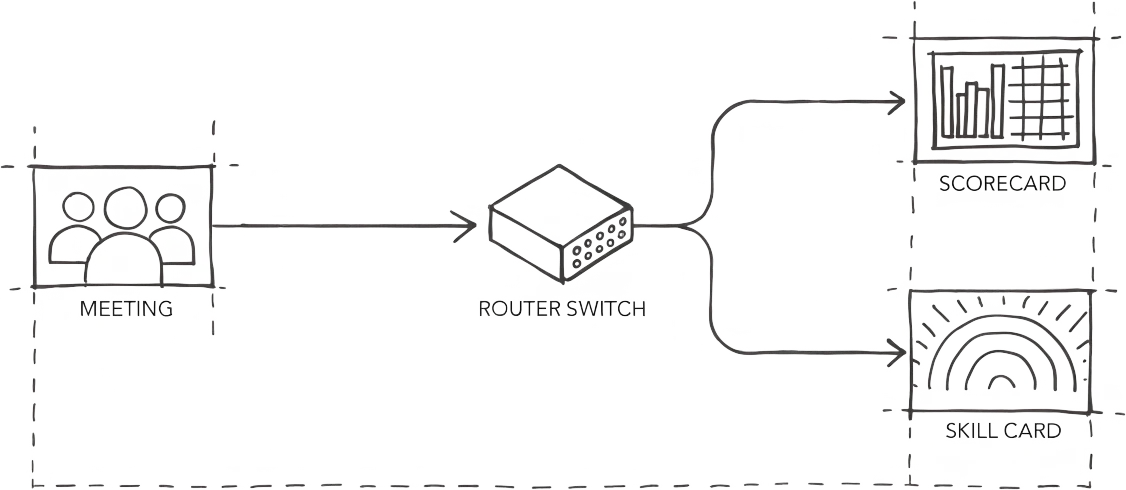
Demodesk AI Coach can automatically apply the right scorecard and coaching skills to every meeting based on user group, meeting type, or keywords in the meeting name. A discovery call gets scored against your discovery scorecard. A demo gets scored against your demo scorecard. No manual selection from your reps, no calls that slip through uncoached.
This is the guide sales teams land on when they want scorecards that adapt to the conversation instead of one generic template per rep.
Who this is for
Revenue leaders, sales managers, and RevOps teams running multiple sales motions — discovery, demo, closing, renewal — who want AI Coach to apply the right methodology to the right call type automatically.
Prerequisites
- Coaching & AI license (EUR 59/user/month, EUR 49 annual)
- Admin access to Demodesk
- At least two scorecards created (e.g., Discovery, Demo, Closing) — see AI Scorecards setup
- Optional: user groups configured if you want to segment rules by team
- Optional: meeting types configured in your calendar or CRM if you want to trigger by type
Steps
1. Open AI Coach automation settings
Go to Agents in the top navigation, then select the Automations sub-tab. Find AI Coach in the list of automations and click into its configuration.
2. Create your first automation rule
Click Add rule (or New rule). Each rule defines which meetings it applies to and which scorecard and skills get used when it matches.
Rules run in descending priority order. The first rule that matches a meeting is the one that fires. Put your most specific rules at the top and your fallback rule at the bottom.
3. Set the rule conditions
Three condition types are available:
- User group — applies the rule only to reps in a specific group (e.g., “New Business AEs” vs. “Account Managers”)
- Meeting type — matches on the meeting type set in the calendar event or CRM (e.g., “Discovery”, “Demo”, “Closing”)
- Meeting name keywords — matches on words in the meeting title (e.g., “Kickoff”, “QBR”, “Renewal”)
Conditions combine with AND logic within a rule. For example: User group = “New Business AEs” AND meeting name contains “Discovery” applies the Discovery scorecard.
4. Link the scorecard and skills to the rule
For each rule, select:
- Scorecard — the coaching framework AI Coach scores against (MEDDIC, BANT, your custom discovery template, etc.)
- Skills — the specific coaching skills AI Coach evaluates on this call type (e.g., “Pain qualification”, “Champion identification”, “Objection handling”)
A demo call is not scored the same way as a discovery call. Different meeting types get different scorecards.
5. Add a fallback rule
Create one final rule at the bottom of the priority list with no conditions. Every meeting that doesn't match a rule above gets this scorecard.
A common pattern: set your fallback to a general discovery scorecard with core skills — rapport, pain qualification, next steps. Every call gets coached even if the meeting type isn't tagged.
6. Configure language detection
Under AI Coach language settings, enable Detect language from transcript. AI Coach reads the transcript and applies the correct language version of your scorecard based on what's spoken on the call, not what's set on the user profile. Useful for teams selling across DACH, France, and English-speaking markets from the same rep pool.
7. Order rules by priority
Drag rules into the correct order. Top = highest priority. Every meeting is evaluated top-down; the first match wins.
Recommended order:
- Most specific rules (user group + meeting type + keyword)
- Meeting type or keyword rules
- User group rules
- Fallback rule (no conditions)
8. Save and test
Save the configuration. Book a meeting that matches one of your rules, record it, and check that AI Coach applied the correct scorecard. Repeat for each rule to verify priority order behaves as expected.
Tips
- Start with three rules, not thirty. Discovery, demo, and a fallback covers 80% of most sales teams. Add more as you spot gaps in the coaching reports.
- Use keywords as a safety net. Even if reps forget to tag the meeting type, “Demo” or “Discovery” in the meeting title still triggers the right rule.
- Segment by user group for multi-motion teams. If your AEs and CSMs share Demodesk but sell differently, put user group at the top of your condition stack.
- Review the fallback quarterly. If it fires more than 30% of the time, your specific rules are too narrow — or your reps aren't tagging meetings consistently.
- Combine with custom skills from the marketplace. Install skills like MEDDIC qualification or Challenger objection handling from the Demodesk Marketplace and link them to the matching rule.
Related skills and agents
- AI Coach product page
- Marketplace: coaching skills and scorecards
- AI Sales Assistant — pairs with AI Coach for post-call summaries per meeting type
- Solutions: Sales Managers